Image segmentation and forced photometry
Since the primary aim of the Band_Data and Data classes we have recently been looking at is to produce a Catalogue of sources, we will also need to be able to identify one object from another. This is done in a process known as segmentation, and in principle is quite challenging to do well, although we will have a go here.
Example 1: Making segmentation maps with SExtractor
The first technique we will use to segment the data into different sources, which is the default in galfind, is to use the SExtractor parameters from Adams et al. 2023. Before starting this example please ensure that this is installed appropriately on your computer; an explanation of how to install SExtractor can be found here. Let’s start by instantiating our JOF data object as before.
[1]:
from copy import deepcopy
import matplotlib.pyplot as plt
import astropy.units as u
from astropy.table import Table
from galfind import config, Data
from galfind.Data import morgan_version_to_dir

survey = "JOF"
version = "v11"
instrument_names = ["NIRCam"]

JOF_data = Data.from_survey_version(
    survey = survey,
    version = version,
    instrument_names = instrument_names,
    version_to_dir_dict = morgan_version_to_dir,
)
Reading GALFIND config file from: /nvme/scratch/work/austind/GALFIND/galfind/../configs/galfind_config.ini
Important:  Gaia archive will be intermittently unavailable due to scheduled maintenance on 14-10-2024 from 10:30 to 12:30 (CEST)
To look at what exactly the segmentation process is doing, we will try it on the F444W band only. To do this, we will first have to load in the aperture diameters.
[ ]:
aper_diams = [0.32, 0.5, 1.0, 1.5, 2.0] * u.arcsec
JOF_data.load_aper_diams(aper_diams)

F444W_JOF = JOF_data["F444W"]
INFO:galfind:Loaded aper_diams=<Quantity [0.32, 0.5 , 1.  , 1.5 , 2.  ] arcsec> for F090W
INFO:galfind:Loaded aper_diams=<Quantity [0.32, 0.5 , 1.  , 1.5 , 2.  ] arcsec> for F115W
INFO:galfind:Loaded aper_diams=<Quantity [0.32, 0.5 , 1.  , 1.5 , 2.  ] arcsec> for F150W
INFO:galfind:Loaded aper_diams=<Quantity [0.32, 0.5 , 1.  , 1.5 , 2.  ] arcsec> for F162M
INFO:galfind:Loaded aper_diams=<Quantity [0.32, 0.5 , 1.  , 1.5 , 2.  ] arcsec> for F182M
INFO:galfind:Loaded aper_diams=<Quantity [0.32, 0.5 , 1.  , 1.5 , 2.  ] arcsec> for F200W
INFO:galfind:Loaded aper_diams=<Quantity [0.32, 0.5 , 1.  , 1.5 , 2.  ] arcsec> for F210M
INFO:galfind:Loaded aper_diams=<Quantity [0.32, 0.5 , 1.  , 1.5 , 2.  ] arcsec> for F250M
INFO:galfind:Loaded aper_diams=<Quantity [0.32, 0.5 , 1.  , 1.5 , 2.  ] arcsec> for F277W
INFO:galfind:Loaded aper_diams=<Quantity [0.32, 0.5 , 1.  , 1.5 , 2.  ] arcsec> for F300M
INFO:galfind:Loaded aper_diams=<Quantity [0.32, 0.5 , 1.  , 1.5 , 2.  ] arcsec> for F335M
INFO:galfind:Loaded aper_diams=<Quantity [0.32, 0.5 , 1.  , 1.5 , 2.  ] arcsec> for F356W
INFO:galfind:Loaded aper_diams=<Quantity [0.32, 0.5 , 1.  , 1.5 , 2.  ] arcsec> for F410M
INFO:galfind:Loaded aper_diams=<Quantity [0.32, 0.5 , 1.  , 1.5 , 2.  ] arcsec> for F444W
We will now segment the F444W JOF imaging. This will take a little while as SExtractor is running; the output will be stored in the config SExtractor/SEX_DIR directory when it has finished under the appropriate survey/version/instrument sub-directories (which in this case this is JOF/v11/NIRCam).
[ ]:
F444W_JOF_2 = deepcopy(F444W_JOF)
F444W_JOF_3 = deepcopy(F444W_JOF)
F444W_JOF_4 = deepcopy(F444W_JOF)
F444W_JOF_5 = deepcopy(F444W_JOF)

F444W_JOF.segment()
print(F444W_JOF)
****************************************
NIRCam/F444W BAND DATA:
----------
SURVEY: JOF
VERSION: v11
PIX SCALE: 0.03 arcsec
ZP: 28.086519392283982
SHAPE: (4464, 10244)
APERTURE DIAMETERS: [0.32 0.5  1.   1.5  2.  ] arcsec
IM PATH: /raid/scratch/data/jwst/JOF/NIRCam/mosaic_1084_wispnathan/30mas/jw04210-o001_t002_nircam_clear-f444w_i2dnobg.fits[1]
RMS ERR PATH: /raid/scratch/data/jwst/JOF/NIRCam/mosaic_1084_wispnathan/30mas/jw04210-o001_t002_nircam_clear-f444w_i2dnobg.fits[2]
WHT PATH: /raid/scratch/data/jwst/JOF/NIRCam/mosaic_1084_wispnathan/30mas/jw04210-o001_t002_nircam_clear-f444w_i2dnobg.fits[4]
SEG PATH: /raid/scratch/work/austind/GALFIND_WORK/SExtractor/NIRCam/v11/JOF/MAP_RMS/segmentation/JOF_F444W_F444W_sel_cat_v11_seg.fits
SEG ARGS: {'err_type': 'rms_err', 'method': 'sextractor', 'config_name': 'default.sex', 'params_name': 'default.param'}
****************************************
In addition to the segmentation map, this function will additionally produce a background map and photometric catalogue with fluxes (from sources selected in the same band) in apertures set by the SExtractor/APER_DIAMS parameter in the config file. The seg_path and the method used to measure this will be saved inside the Band_Data class for future access.
Now let’s say we wanted to load the path to the segmentation map rather than making it. We can simply run this function again on a fresh Band_Data object, and if the required file already exists it will load the path to it.
[4]:
F444W_JOF_2.segment()
We see from above that SExtractor is not called here. If we wanted to re-run this segmentation map for whatever reason, there are two possible actions we could take:
Delete or move the saved segmentation map manually
Pass
overwrite=Trueinto thesegmentfunction on a pre-segmented object
Option 2 is the preferred, and probably more straight forward, choice to make here. Below is its implementation.
[5]:
# re-segment using SExtractor
F444W_JOF_3.segment(overwrite=False) # True
Excellent! We have overwritten the original segmentation map, albeit with the exact same SExtractor output. Next we will produce a segmentation map using the stored wht map rather than the rms_err map by changing the err_type attribute from the default rms_err to wht.
[6]:
F444W_JOF_4.segment("wht", overwrite=False) # True
print(F444W_JOF_4)
****************************************
NIRCam/F444W BAND DATA:
----------
SURVEY: JOF
VERSION: v11
PIX SCALE: 0.03 arcsec
ZP: 28.086519392283982
SHAPE: (4464, 10244)
APERTURE DIAMETERS: [0.32 0.5  1.   1.5  2.  ] arcsec
IM PATH: /raid/scratch/data/jwst/JOF/NIRCam/mosaic_1084_wispnathan/30mas/jw04210-o001_t002_nircam_clear-f444w_i2dnobg.fits[1]
RMS ERR PATH: /raid/scratch/data/jwst/JOF/NIRCam/mosaic_1084_wispnathan/30mas/jw04210-o001_t002_nircam_clear-f444w_i2dnobg.fits[2]
WHT PATH: /raid/scratch/data/jwst/JOF/NIRCam/mosaic_1084_wispnathan/30mas/jw04210-o001_t002_nircam_clear-f444w_i2dnobg.fits[4]
SEG PATH: /raid/scratch/work/austind/GALFIND_WORK/SExtractor/NIRCam/v11/JOF/MAP_WEIGHT/segmentation/JOF_F444W_F444W_sel_cat_v11_seg.fits
SEG ARGS: {'err_type': 'wht', 'method': 'sextractor', 'config_name': 'default.sex', 'params_name': 'default.param'}
****************************************
This will update the segmentation map path in the Band_Data object for F444W and make a new segmentation map using the wht path, although will not actually overwrite the previously run rms_err map. The difference between the two maps can be seen by comparing the segmentation maps generated from the two separate weight maps.
[7]:
# load the segmentation maps
rms_err_seg = F444W_JOF.load_seg(incl_hdr = False)
wht_seg = F444W_JOF_4.load_seg(incl_hdr = False)
# plot the difference
fig, ax = plt.subplots()
ax.imshow(wht_seg.astype(bool) & ~rms_err_seg.astype(bool), origin = "lower")
ax.set_title("bool(WHT SEG) AND NOT bool(ERR SEG)")
ax.set_xlabel("x [pix]")
ax.set_ylabel("y [pix]")
plt.show()

Here we can see there is a minor difference between SExtractor segmentation using the ERR and WHT maps in that the WHT maps segments more of the outskirts surrounding bright objects in the wisp affected modules.
Lastly, we will regularly want to produce segmentation maps for every band used in a particular survey, for instance when running a cataloguing pipeline. As before, this takes in err_type, method, and overwrite arguments; we will implement the default functionality of this below.
[8]:
JOF_data.segment(err_type="rms_err", method="sextractor", overwrite=False)
print(JOF_data)
****************************************
DATA OBJECT:
----------
SURVEY: JOF
VERSION: v11
****************************************
MULTIPLE_FILTER
----------
FACILITY: JWST
INSTRUMENT: NIRCam
FILTERS: ['F090W', 'F115W', 'F150W', 'F162M', 'F182M', 'F200W', 'F210M', 'F250M', 'F277W', 'F300M', 'F335M', 'F356W', 'F410M', 'F444W']
****************************************
NIRCam COMMON ATTRIBUTES:
----------
IM DIR: /raid/scratch/data/jwst/JOF/NIRCam/mosaic_1084_wispnathan/30mas
RMS ERR DIR: /raid/scratch/data/jwst/JOF/NIRCam/mosaic_1084_wispnathan/30mas
WHT DIR: /raid/scratch/data/jwst/JOF/NIRCam/mosaic_1084_wispnathan/30mas
SEG DIR: /raid/scratch/work/austind/GALFIND_WORK/SExtractor/NIRCam/v11/JOF/MAP_RMS/segmentation
IM EXT: 1
RMS ERR EXT: 2
WHT EXT: 4
ZP: 28.0865
PIX SCALE: 0.03 arcsec
DATA SHAPE: (4464, 10244)
SEG ARGS: {'err_type': 'rms_err', 'method': 'sextractor', 'config_name': 'default.sex', 'params_name': 'default.param'}
----------
****************************************
NIRCam/F090W
----------
IM NAME: jw01210-o001_t002_nircam_clear-f090w_i2dnobg.fits[1]
RMS ERR NAME: jw01210-o001_t002_nircam_clear-f090w_i2dnobg.fits[2]
WHT NAME: jw01210-o001_t002_nircam_clear-f090w_i2dnobg.fits[4]
SEG PATH: JOF_F090W_F090W_sel_cat_v11_seg.fits
****************************************
NIRCam/F115W
----------
IM NAME: jw01210-o001_t002_nircam_clear-f115w_i2dnobg.fits[1]
RMS ERR NAME: jw01210-o001_t002_nircam_clear-f115w_i2dnobg.fits[2]
WHT NAME: jw01210-o001_t002_nircam_clear-f115w_i2dnobg.fits[4]
SEG PATH: JOF_F115W_F115W_sel_cat_v11_seg.fits
****************************************
NIRCam/F150W
----------
IM NAME: jw01210-o001_t002_nircam_clear-f150w_i2dnobg.fits[1]
RMS ERR NAME: jw01210-o001_t002_nircam_clear-f150w_i2dnobg.fits[2]
WHT NAME: jw01210-o001_t002_nircam_clear-f150w_i2dnobg.fits[4]
SEG PATH: JOF_F150W_F150W_sel_cat_v11_seg.fits
****************************************
NIRCam/F162M
----------
IM NAME: jw03215-o001_t002_nircam_clear-f162m_i2dnobg.fits[1]
RMS ERR NAME: jw03215-o001_t002_nircam_clear-f162m_i2dnobg.fits[2]
WHT NAME: jw03215-o001_t002_nircam_clear-f162m_i2dnobg.fits[4]
SEG PATH: JOF_F162M_F162M_sel_cat_v11_seg.fits
****************************************
NIRCam/F182M
----------
IM NAME: jw03215-o001_t002_nircam_clear-f182m_i2dnobg.fits[1]
RMS ERR NAME: jw03215-o001_t002_nircam_clear-f182m_i2dnobg.fits[2]
WHT NAME: jw03215-o001_t002_nircam_clear-f182m_i2dnobg.fits[4]
SEG PATH: JOF_F182M_F182M_sel_cat_v11_seg.fits
****************************************
NIRCam/F200W
----------
IM NAME: jw01210-o001_t002_nircam_clear-f200w_i2dnobg.fits[1]
RMS ERR NAME: jw01210-o001_t002_nircam_clear-f200w_i2dnobg.fits[2]
WHT NAME: jw01210-o001_t002_nircam_clear-f200w_i2dnobg.fits[4]
SEG PATH: JOF_F200W_F200W_sel_cat_v11_seg.fits
****************************************
NIRCam/F210M
----------
IM NAME: jw03215-o001_t002_nircam_clear-f210m_i2dnobg.fits[1]
RMS ERR NAME: jw03215-o001_t002_nircam_clear-f210m_i2dnobg.fits[2]
WHT NAME: jw03215-o001_t002_nircam_clear-f210m_i2dnobg.fits[4]
SEG PATH: JOF_F210M_F210M_sel_cat_v11_seg.fits
****************************************
NIRCam/F250M
----------
IM NAME: jw03215-o001_t002_nircam_clear-f250m_i2dnobg.fits[1]
RMS ERR NAME: jw03215-o001_t002_nircam_clear-f250m_i2dnobg.fits[2]
WHT NAME: jw03215-o001_t002_nircam_clear-f250m_i2dnobg.fits[4]
SEG PATH: JOF_F250M_F250M_sel_cat_v11_seg.fits
****************************************
NIRCam/F277W
----------
IM NAME: jw01210-o001_t002_nircam_clear-f277w_i2dnobg.fits[1]
RMS ERR NAME: jw01210-o001_t002_nircam_clear-f277w_i2dnobg.fits[2]
WHT NAME: jw01210-o001_t002_nircam_clear-f277w_i2dnobg.fits[4]
SEG PATH: JOF_F277W_F277W_sel_cat_v11_seg.fits
****************************************
NIRCam/F300M
----------
IM NAME: jw03215-o001_t002_nircam_clear-f300m_i2dnobg.fits[1]
RMS ERR NAME: jw03215-o001_t002_nircam_clear-f300m_i2dnobg.fits[2]
WHT NAME: jw03215-o001_t002_nircam_clear-f300m_i2dnobg.fits[4]
SEG PATH: JOF_F300M_F300M_sel_cat_v11_seg.fits
****************************************
NIRCam/F335M
----------
IM NAME: jw03215-o001_t002_nircam_clear-f335m_i2dnobg.fits[1]
RMS ERR NAME: jw03215-o001_t002_nircam_clear-f335m_i2dnobg.fits[2]
WHT NAME: jw03215-o001_t002_nircam_clear-f335m_i2dnobg.fits[4]
SEG PATH: JOF_F335M_F335M_sel_cat_v11_seg.fits
****************************************
NIRCam/F356W
----------
IM NAME: jw01210-o001_t002_nircam_clear-f356w_i2dnobg.fits[1]
RMS ERR NAME: jw01210-o001_t002_nircam_clear-f356w_i2dnobg.fits[2]
WHT NAME: jw01210-o001_t002_nircam_clear-f356w_i2dnobg.fits[4]
SEG PATH: JOF_F356W_F356W_sel_cat_v11_seg.fits
****************************************
NIRCam/F410M
----------
IM NAME: jw01210-o001_t002_nircam_clear-f410m_i2dnobg.fits[1]
RMS ERR NAME: jw01210-o001_t002_nircam_clear-f410m_i2dnobg.fits[2]
WHT NAME: jw01210-o001_t002_nircam_clear-f410m_i2dnobg.fits[4]
SEG PATH: JOF_F410M_F410M_sel_cat_v11_seg.fits
****************************************
NIRCam/F444W
----------
IM NAME: jw04210-o001_t002_nircam_clear-f444w_i2dnobg.fits[1]
RMS ERR NAME: jw04210-o001_t002_nircam_clear-f444w_i2dnobg.fits[2]
WHT NAME: jw04210-o001_t002_nircam_clear-f444w_i2dnobg.fits[4]
SEG PATH: JOF_F444W_F444W_sel_cat_v11_seg.fits
****************************************
****************************************
Example 2: Plotting the segmentation maps
Once the segmentation map has been created, the next step is to plot it. We use the Data.plot() function using the ext = "SEG" argument. There are a few more arguments that we write explicitly for clarity, although we note that for now we will keep these as the galfind defaults.
[9]:
JOF_data["F444W"].plot(ext = "SEG", cmap = "plasma", show = True)
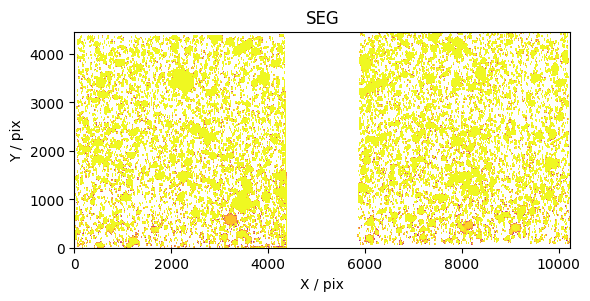
Maybe we also want to zoom into a specific region of the segmentation map as well to have a closer look at some specific sources. Let’s change some of the default arguments now to see how this changes the output plot.
Example 3: Running forced photometry using SExtractor
In previous notebooks and examples 1 and 2 we have seen how to load a photometric Data class and produce segmentation maps using SExtractor. Now we will produce a catalogue of forced photometry, required for producing photometric source catalogues.
The perform_forced_phot() method in Data and Band_Data_Base is used to: 1. Perform forced photometry using a specific selection band, including the possibility of using stacked data 2. Produce a photometric catalogue with aperture (and Kron) fluxes in a range of chosen aperture sizes, and other associated (currently just SExtractor) derived properties 3. Create a README for the catalogue which is updated at runtime to describe what is included (TO DO)
[10]:
JOF_data_2 = Data.from_survey_version(
    survey = survey,
    version = version,
    instrument_names = instrument_names,
    version_to_dir_dict = morgan_version_to_dir,
    aper_diams = aper_diams,
    forced_phot_band = ["F277W", "F356W", "F444W"],
)
INFO:galfind:Loaded aper_diams=<Quantity [0.32, 0.5 , 1. , 1.5 , 2. ] arcsec> for F277W+F356W+F444W
[11]:
JOF_data_2.segment(err_type="rms_err", method="sextractor", overwrite=False)
JOF_data_2.perform_forced_phot()
print(JOF_data_2)
****************************************
DATA OBJECT:
----------
SURVEY: JOF
VERSION: v11
PHOTOMETRIC CATALOGUE: /raid/scratch/work/austind/GALFIND_WORK/Catalogues/v11/NIRCam/JOF/(0.32,0.50,1.00,1.50,2.00)as/JOF_MASTER_Sel-F277W+F356W+F444W_v11.fits
APERTURE DIAMETERS: [0.32 0.5  1.   1.5  2.  ] arcsec
SELECTION BAND: NIRCam/F277W+F356W+F444W
****************************************
MULTIPLE_FILTER
----------
FACILITY: JWST
INSTRUMENT: NIRCam
FILTERS: ['F090W', 'F115W', 'F150W', 'F162M', 'F182M', 'F200W', 'F210M', 'F250M', 'F277W', 'F300M', 'F335M', 'F356W', 'F410M', 'F444W']
****************************************
NIRCam COMMON ATTRIBUTES:
----------
IM DIR: /raid/scratch/data/jwst/JOF/NIRCam/mosaic_1084_wispnathan/30mas
RMS ERR DIR: /raid/scratch/data/jwst/JOF/NIRCam/mosaic_1084_wispnathan/30mas
WHT DIR: /raid/scratch/data/jwst/JOF/NIRCam/mosaic_1084_wispnathan/30mas
SEG DIR: /raid/scratch/work/austind/GALFIND_WORK/SExtractor/NIRCam/v11/JOF/MAP_RMS/segmentation
FORCED PHOT DIR: /raid/scratch/work/austind/GALFIND_WORK/SExtractor/NIRCam/v11/JOF/MAP_RMS/forced_phot/(0.32,0.50,1.00,1.50,2.00)as
IM EXT: 1
RMS ERR EXT: 2
WHT EXT: 4
ZP: 28.0865
PIX SCALE: 0.03 arcsec
DATA SHAPE: (4464, 10244)
SEG ARGS: {'err_type': 'rms_err', 'method': 'sextractor', 'config_name': 'default.sex', 'params_name': 'default.param'}
FORCED PHOT ARGS: {'forced_phot_band': NIRCam/F277W+F356W+F444W, 'err_type': 'rms_err', 'method': 'sextractor', 'config_name': 'default.sex', 'params_name': 'default.param', 'ra_label': 'ALPHA_J2000', 'dec_label': 'DELTA_J2000'}
----------
****************************************
NIRCam/F090W
----------
IM NAME: jw01210-o001_t002_nircam_clear-f090w_i2dnobg.fits[1]
RMS ERR NAME: jw01210-o001_t002_nircam_clear-f090w_i2dnobg.fits[2]
WHT NAME: jw01210-o001_t002_nircam_clear-f090w_i2dnobg.fits[4]
SEG PATH: JOF_F090W_F090W_sel_cat_v11_seg.fits
FORCED PHOT PATH: JOF_F090W_F277W+F356W+F444W_sel_cat_v11.fits
****************************************
NIRCam/F115W
----------
IM NAME: jw01210-o001_t002_nircam_clear-f115w_i2dnobg.fits[1]
RMS ERR NAME: jw01210-o001_t002_nircam_clear-f115w_i2dnobg.fits[2]
WHT NAME: jw01210-o001_t002_nircam_clear-f115w_i2dnobg.fits[4]
SEG PATH: JOF_F115W_F115W_sel_cat_v11_seg.fits
FORCED PHOT PATH: JOF_F115W_F277W+F356W+F444W_sel_cat_v11.fits
****************************************
NIRCam/F150W
----------
IM NAME: jw01210-o001_t002_nircam_clear-f150w_i2dnobg.fits[1]
RMS ERR NAME: jw01210-o001_t002_nircam_clear-f150w_i2dnobg.fits[2]
WHT NAME: jw01210-o001_t002_nircam_clear-f150w_i2dnobg.fits[4]
SEG PATH: JOF_F150W_F150W_sel_cat_v11_seg.fits
FORCED PHOT PATH: JOF_F150W_F277W+F356W+F444W_sel_cat_v11.fits
****************************************
NIRCam/F162M
----------
IM NAME: jw03215-o001_t002_nircam_clear-f162m_i2dnobg.fits[1]
RMS ERR NAME: jw03215-o001_t002_nircam_clear-f162m_i2dnobg.fits[2]
WHT NAME: jw03215-o001_t002_nircam_clear-f162m_i2dnobg.fits[4]
SEG PATH: JOF_F162M_F162M_sel_cat_v11_seg.fits
FORCED PHOT PATH: JOF_F162M_F277W+F356W+F444W_sel_cat_v11.fits
****************************************
NIRCam/F182M
----------
IM NAME: jw03215-o001_t002_nircam_clear-f182m_i2dnobg.fits[1]
RMS ERR NAME: jw03215-o001_t002_nircam_clear-f182m_i2dnobg.fits[2]
WHT NAME: jw03215-o001_t002_nircam_clear-f182m_i2dnobg.fits[4]
SEG PATH: JOF_F182M_F182M_sel_cat_v11_seg.fits
FORCED PHOT PATH: JOF_F182M_F277W+F356W+F444W_sel_cat_v11.fits
****************************************
NIRCam/F200W
----------
IM NAME: jw01210-o001_t002_nircam_clear-f200w_i2dnobg.fits[1]
RMS ERR NAME: jw01210-o001_t002_nircam_clear-f200w_i2dnobg.fits[2]
WHT NAME: jw01210-o001_t002_nircam_clear-f200w_i2dnobg.fits[4]
SEG PATH: JOF_F200W_F200W_sel_cat_v11_seg.fits
FORCED PHOT PATH: JOF_F200W_F277W+F356W+F444W_sel_cat_v11.fits
****************************************
NIRCam/F210M
----------
IM NAME: jw03215-o001_t002_nircam_clear-f210m_i2dnobg.fits[1]
RMS ERR NAME: jw03215-o001_t002_nircam_clear-f210m_i2dnobg.fits[2]
WHT NAME: jw03215-o001_t002_nircam_clear-f210m_i2dnobg.fits[4]
SEG PATH: JOF_F210M_F210M_sel_cat_v11_seg.fits
FORCED PHOT PATH: JOF_F210M_F277W+F356W+F444W_sel_cat_v11.fits
****************************************
NIRCam/F250M
----------
IM NAME: jw03215-o001_t002_nircam_clear-f250m_i2dnobg.fits[1]
RMS ERR NAME: jw03215-o001_t002_nircam_clear-f250m_i2dnobg.fits[2]
WHT NAME: jw03215-o001_t002_nircam_clear-f250m_i2dnobg.fits[4]
SEG PATH: JOF_F250M_F250M_sel_cat_v11_seg.fits
FORCED PHOT PATH: JOF_F250M_F277W+F356W+F444W_sel_cat_v11.fits
****************************************
NIRCam/F277W
----------
IM NAME: jw01210-o001_t002_nircam_clear-f277w_i2dnobg.fits[1]
RMS ERR NAME: jw01210-o001_t002_nircam_clear-f277w_i2dnobg.fits[2]
WHT NAME: jw01210-o001_t002_nircam_clear-f277w_i2dnobg.fits[4]
SEG PATH: JOF_F277W_F277W_sel_cat_v11_seg.fits
FORCED PHOT PATH: JOF_F277W_F277W+F356W+F444W_sel_cat_v11.fits
****************************************
NIRCam/F300M
----------
IM NAME: jw03215-o001_t002_nircam_clear-f300m_i2dnobg.fits[1]
RMS ERR NAME: jw03215-o001_t002_nircam_clear-f300m_i2dnobg.fits[2]
WHT NAME: jw03215-o001_t002_nircam_clear-f300m_i2dnobg.fits[4]
SEG PATH: JOF_F300M_F300M_sel_cat_v11_seg.fits
FORCED PHOT PATH: JOF_F300M_F277W+F356W+F444W_sel_cat_v11.fits
****************************************
NIRCam/F335M
----------
IM NAME: jw03215-o001_t002_nircam_clear-f335m_i2dnobg.fits[1]
RMS ERR NAME: jw03215-o001_t002_nircam_clear-f335m_i2dnobg.fits[2]
WHT NAME: jw03215-o001_t002_nircam_clear-f335m_i2dnobg.fits[4]
SEG PATH: JOF_F335M_F335M_sel_cat_v11_seg.fits
FORCED PHOT PATH: JOF_F335M_F277W+F356W+F444W_sel_cat_v11.fits
****************************************
NIRCam/F356W
----------
IM NAME: jw01210-o001_t002_nircam_clear-f356w_i2dnobg.fits[1]
RMS ERR NAME: jw01210-o001_t002_nircam_clear-f356w_i2dnobg.fits[2]
WHT NAME: jw01210-o001_t002_nircam_clear-f356w_i2dnobg.fits[4]
SEG PATH: JOF_F356W_F356W_sel_cat_v11_seg.fits
FORCED PHOT PATH: JOF_F356W_F277W+F356W+F444W_sel_cat_v11.fits
****************************************
NIRCam/F410M
----------
IM NAME: jw01210-o001_t002_nircam_clear-f410m_i2dnobg.fits[1]
RMS ERR NAME: jw01210-o001_t002_nircam_clear-f410m_i2dnobg.fits[2]
WHT NAME: jw01210-o001_t002_nircam_clear-f410m_i2dnobg.fits[4]
SEG PATH: JOF_F410M_F410M_sel_cat_v11_seg.fits
FORCED PHOT PATH: JOF_F410M_F277W+F356W+F444W_sel_cat_v11.fits
****************************************
NIRCam/F444W
----------
IM NAME: jw04210-o001_t002_nircam_clear-f444w_i2dnobg.fits[1]
RMS ERR NAME: jw04210-o001_t002_nircam_clear-f444w_i2dnobg.fits[2]
WHT NAME: jw04210-o001_t002_nircam_clear-f444w_i2dnobg.fits[4]
SEG PATH: JOF_F444W_F444W_sel_cat_v11_seg.fits
FORCED PHOT PATH: JOF_F444W_F277W+F356W+F444W_sel_cat_v11.fits
****************************************
****************************************
Now let’s have a look at the catalogue this has produced.
[12]:
tab = Table.read(JOF_data_2.phot_cat_path)
print(tab)
  NUMBER     X_IMAGE     Y_IMAGE   ... FLAGS_F444W ISOAREA_IMAGE_F444W
               pix         pix     ...                     pix2
---------- ----------- ----------- ... ----------- -------------------
         1   9219.8145    743.6143 ...           2               24934
         2   6108.1621    543.1823 ...           0               15250
         3   7386.6421    518.4732 ...           2               11853
         4   8138.5957    472.6456 ...           2               21621
         5   8047.3140    369.3903 ...           3                4953
         6   9006.2188    330.5024 ...           3               10204
         7    765.8052    389.6784 ...           3               10175
         8   1647.3230    381.3969 ...           3                8131
         9   6701.1450    368.3413 ...           2                6157
        10     82.3648    355.8787 ...          18                3895
       ...         ...         ... ...         ...                 ...
     16326    165.1400   4290.8848 ...           2                   7
     16327   1572.5746   3880.5979 ...           0                  43
     16328    519.1140   3818.2654 ...           0                   4
     16329   2450.3884   4210.3047 ...           0                  24
     16330   1747.7365   3890.1292 ...           1                  13
     16331    358.0430   3908.7808 ...           0                  55
     16332    210.6940   3880.5181 ...           0                 289
     16333   1042.0570   3963.1199 ...           0                   6
     16334    801.5937   3915.8589 ...           3                   2
     16335   9108.6465   3653.9946 ...           0                 274
Length = 16335 rows
Example 4: Re-configuring SExtractor
We have shown how running SExtractor can work using the default configuration, but what if we want to change this? This is rather straightforwards, as we can simply use the config_path argument of the Band_Data/Stacked_Band_Data/Data segment function. Let’s have a go at this now, again for the F444W filter, also showing explicitly how the default output parameters can be changed with params_name. The default params_name is still used here, although more information regarding
which output parameters are saved can be found in the official SExtractor documentation.
[13]:
F444W_JOF_5.segment("rms_err", config_name="test1.sex", params_name="default.param")
Hmm, looks like the already run default segmentation maps are loaded in here instead of the ones we wanted to use with the updated config file. Of course we could have set overwrite=True in the above code block, but should we wish to compare the two SExtractor outputs we will need to keep the original data too. To get around this, we will use a new version name called v11_test. This will load in the v11 data but save all of the products in v11_test folders. Due to this
functionality, we caution the reader to not include underscores in their version names.
[14]:
JOF_data_test = Data.from_survey_version(
    survey = survey,
    version = f"{version}_test",
    instrument_names = instrument_names,
    version_to_dir_dict = morgan_version_to_dir,
    aper_diams = aper_diams,
)
F444W_JOF_test = JOF_data_test["F444W"]
F444W_JOF_test.segment("rms_err", config_name="test.sex", params_name="default.param", overwrite=False) # True
That’s all well and good, but what is the difference between these outputs? The difference between default.sex and test.sex is that the parameters DETECT_MINAREA, DETECT_THRESH, and ANALYSIS_THRESH have been changed. We should plot the difference to see how this impacts things.
[15]:
# load the segmentation maps
default_seg = F444W_JOF.load_seg(incl_hdr = False)
test_seg = F444W_JOF_test.load_seg(incl_hdr = False)
# plot the difference
fig, ax = plt.subplots()
ax.imshow(default_seg.astype(bool) & ~test_seg.astype(bool), origin = "lower")
ax.set_title("bool(DEFAULT) AND NOT bool(TEST)")
ax.set_xlabel("x [pix]")
ax.set_ylabel("y [pix]")
plt.show()
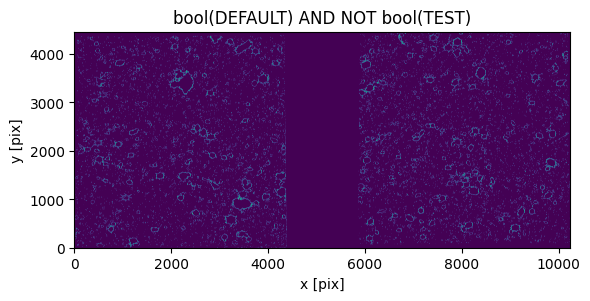
It should be easy to now test different SExtractor configurations iteratively until you find the parameters ideal for your specific science goals.